
Here's a question worth sitting with: why does a beautifully designed website still feel sluggish? You've picked the right fonts, compressed the images, minified the CSS, and yet, pages crawl.
Nine times out of ten, the culprit isn't the design at all. It's the web hosting sitting underneath it, quietly deciding how fast (or slow) everything loads. Most business owners obsess over what visitors see. Few think about the server actually delivering that experience, and that's a mistake.
Why a Beautiful Website Can Still Feel Slow?
Design is the paint job. Hosting is the engine. A site can have flawless UX and still stall out if the server response time is poor. Shared web hosting plans, oversold resources, distant data centers, these things don't show up in a Figma file, but they show up in your load time.
Think about it this way: you could hire the best architect in the world, but if the foundation is cracked, the house won't stand right. Website performance works the same. Visual polish matters. It just doesn't matter at first.
How Web Hosting Affects Website Performance Behind the Scenes
There's a lot happening between a user clicking a link and a page actually rendering. Server processing time, bandwidth allocation, caching layers, CDN integration, all of it ties back to infrastructure.
A few technical factors worth knowing:
- Server location and latency (closer servers, faster delivery)
- Resource allocation, CPU, RAM, and disk I/O speed
- Uptime reliability, especially during traffic spikes
- Server-side caching and database query speed
- Network architecture and redundancy
None of these are visible on the front end. But they decide, almost entirely, how your site performs under load.
Signs Your Hosting May Be the Real Problem
Not sure if hosting is the bottleneck? Look for these patterns. They tend to repeat.
- Your site slows down specifically during traffic spikes or campaigns
- Load times vary wildly across regions
- You've optimized images and code, but speed barely improved
- Frequent 500 errors or timeouts, especially at scale
- Your hosting provider offers no SLA or vague uptime guarantees
- Support response is slow, generic, or outsourced with no technical depth
If two or more of these sound familiar, it's probably not your design team's fault. It's the ground they're building on.
How Slow Hosting Affects SEO and User Experience
Google doesn't care how pretty your homepage is. It cares about Core Web Vitals, metrics like Largest Contentful Paint and Time to First Byte, both of which are directly influenced by hosting quality. A slow server drags these numbers down, and rankings follow.
Users notice too. Attention spans are short, and patience is shorter. A few extra seconds can be the difference between a purchase and an abandoned cart.
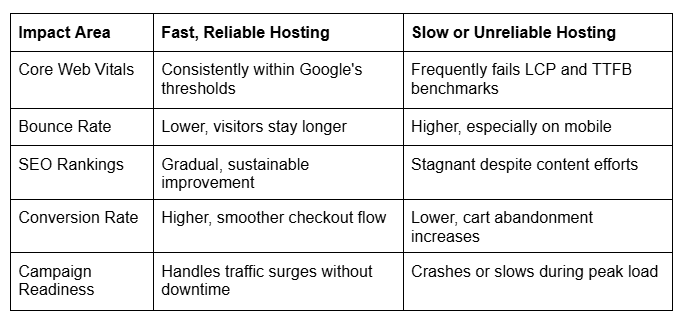
The pattern is fairly consistent across industries. Web hosting quality shows up everywhere else, indirectly, but persistently.
What to Look for When Choosing Better Hosting
So, what actually separates dependable infrastructure from a liability? A few criteria matter more than others.
Performance-related factors:
- SSD-based storage with fast I/O speeds
- Scalable resources (so growth doesn't mean migration)
- Data center locations near your target audience
- Built-in caching or CDN support
Reliability-related factors:
- Documented uptime SLA, ideally 99.9% or higher
- Redundant server architecture
- 24/7 technical support with actual expertise (not just scripts)
- Security measures like DDoS protection and regular backups
Business-related factors:
- Transparent pricing without hidden resource caps
- Room to scale as traffic grows
- Support for e-commerce and seasonal traffic spikes
Knowing where and how you host website assets can have a direct impact on business performance. Instead of focusing solely on the lowest price, businesses should choose infrastructure that can support growth, maintain reliability during traffic spikes, and deliver a consistent user experience.
Website Speed Improvements That Go Beyond Design
Design optimization still matters. Compressing images, lazy loading, reducing third-party scripts, all useful. But there's a ceiling to what front-end fixes can achieve if the backend is weak.
Real, lasting improvements usually involve:
- Migrating to infrastructure with better server response times
- Using a CDN alongside your host, not instead of one
- Monitoring website infrastructure performance monthly, not just after complaints
- Load testing before major campaigns or product launches
- Reviewing hosting plans annually as traffic and business needs evolve
Website scalability isn't just a technical nice-to-have. It's a revenue consideration. Every second of delay costs conversions somewhere down the funnel.
Conclusion
Design gets the credit. Hosting does the heavy lifting. If your site still feels slow after every redesign, it might be time to look one layer deeper, at the server, not the surface. Reliable infrastructure isn't glamorous, but it's foundational, and it's usually the difference between a site that merely looks good and one that actually performs.